
Meet the New High QR Code Generator: One Workbench and Bulk Mode for Every QR Type
Today we launched a redesigned QR code generator: every QR type on one screen with a live preview, bulk mode for all 20 QR types, an easier logo upload, and full Japanese, Korean, and Traditional Chinese versions.
Today we launched the biggest update to High QR Code Generator since the site went live. The generator has a new design, every QR code type now has its own bulk mode, and every tool and guide is now fully translated into Japanese, Korean, and Traditional Chinese. It is still free, it still needs no account, and your content still never leaves your browser.
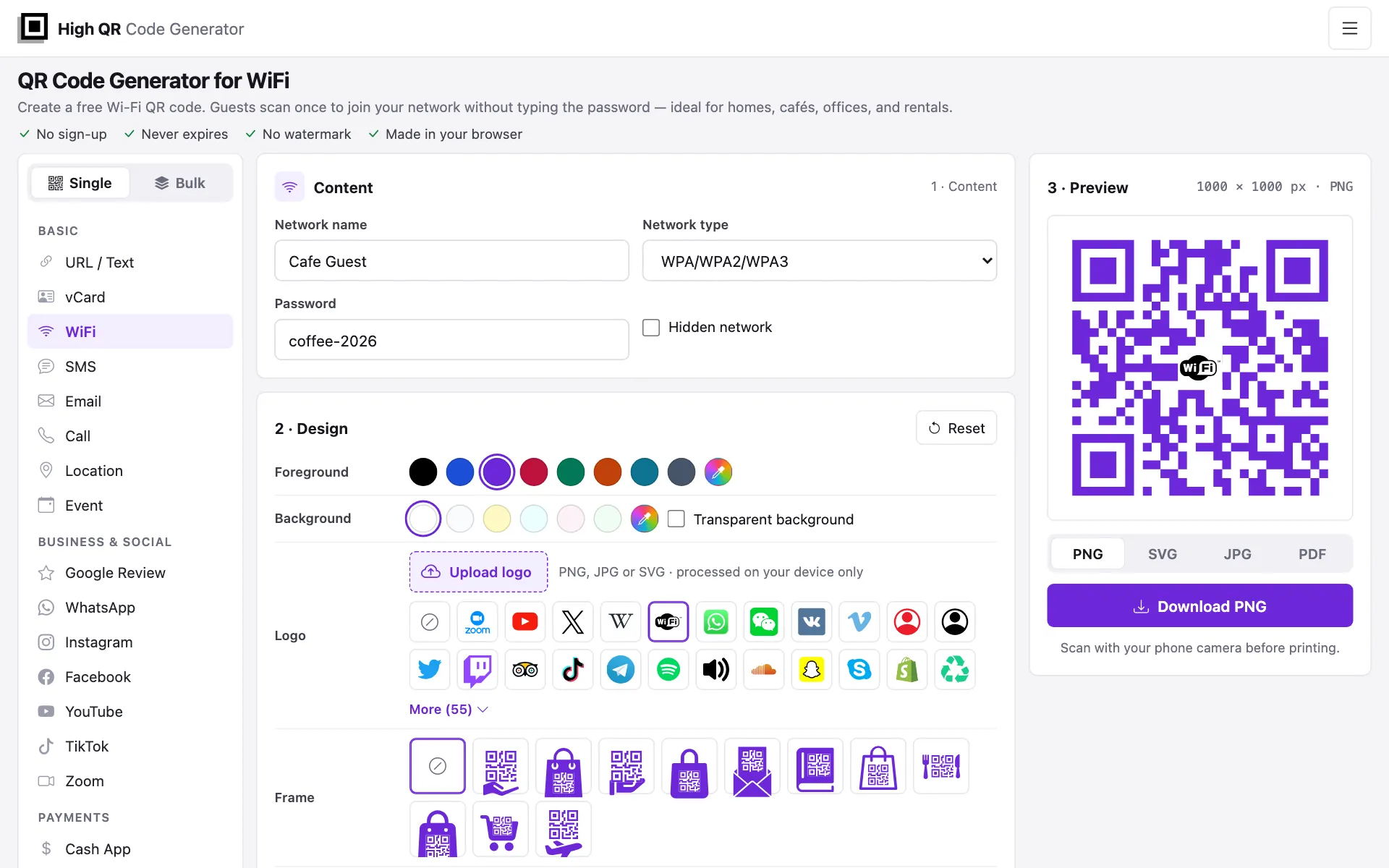
One workbench for every QR code
Before, each QR type had its own form layout, the design options sat behind tabs, and bulk codes needed a separate page and a Generate button. The new generator puts everything on one screen:
- Pick a type on the left. All 20 QR code types are grouped into Basic, Business & social, and Payments. On a phone, the most popular types appear as chips and the rest sit under More.
- Fill in the content. Each type has its own form: a link, a Wi-Fi network, a contact card, a PayPal payment, a calendar event, and so on.
- Adjust the design. Colors, a transparent background, a logo, a frame, and the export size sit together in the Design card. There is no dialog to open.
- Watch the preview. The QR code updates as you type, so there is no Generate button.
- Download. Choose PNG, SVG, JPG, or PDF and save the file.
Every QR type still has its own page and address, so your links and bookmarks keep working.
New: bulk mode for every QR code type
Until today, only links and plain text could be made in bulk, on the bulk QR code generator. Now every QR type has a Bulk switch at the top of the type list. Turn it on and the form becomes a table with that type's columns: name, phone, and email for contact cards, network name and password for Wi-Fi, payment type and price for PayPal.
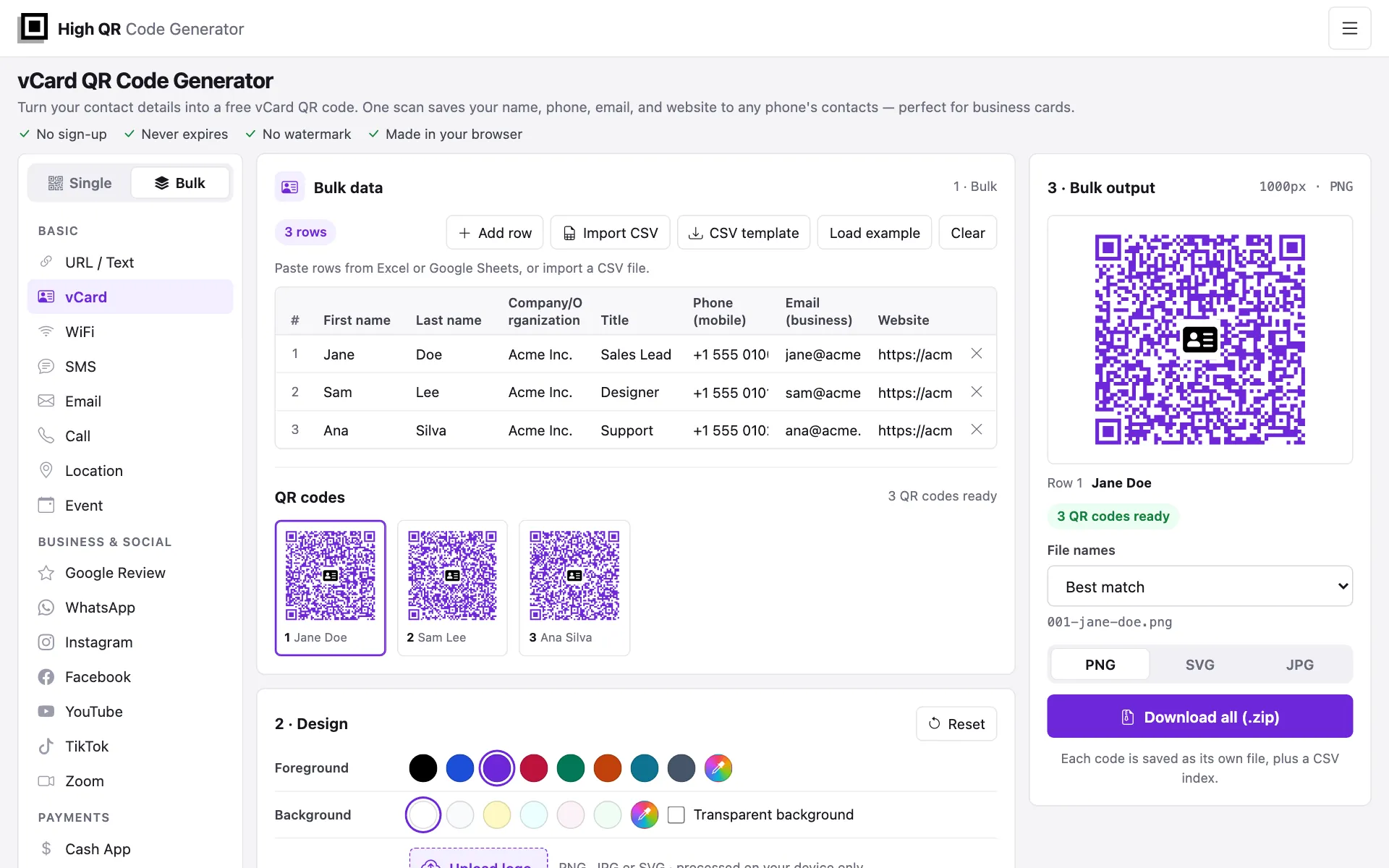
- Paste from a spreadsheet. Copy rows from Excel or Google Sheets and paste them into the table. If you include a header row, the columns are matched by name.
- Import a CSV file, or download a CSV template with the right columns and fill it in.
- Load the example rows to see how a batch looks before you enter your own data.
- Fix mistakes before you download. Rows with a missing or invalid value are marked.
- Download the whole batch as one ZIP file. Choose PNG, SVG, or JPG, name the files after a column such as each person's name, and use the included CSV index to see which file holds which code.
A few ideas: a Wi-Fi code for every room or floor, contact cards for a whole team, a PayPal or UPI code for every product or table, or calendar codes for a series of events. The design you choose applies to every code in the batch.
A clearer design panel
- Upload your own logo with the new Upload logo button, or drag an image onto it. The image is processed on your device only, and it is remembered for your next visit. You can also pick one of 55 built-in logos.
- Add a frame from 11 designs, in one of eight colors.
- Choose colors from a set of swatches or pick any custom color, with an optional transparent background.
- Set the size with presets of 300, 512, 1,000, and 2,000 pixels, or type any size up to 4,000 pixels. New codes now start at 1,000 pixels, sharp enough for print.
- Codes with a logo scan more reliably. They now use a stronger error-correction level, which leaves more room for the logo in the middle.
Small fixes you might notice
- Wi-Fi codes now handle passwords with special characters such as
;,,,:and", and new Wi-Fi codes default to WPA/WPA2/WPA3. - Phone, SMS, and WhatsApp codes drop the leading 0 of a local number when you choose a country code, so the number dials correctly.
- Email codes keep the spaces in your subject and message.
- Bitcoin and other crypto codes leave the amount out when you don't set one, so the payer can enter it. Ether codes use the standard
ethereum:format. - All-day calendar events that span several days now include their last day.
- The country-code list shows country names in your language.
Now in four languages
Every tool, guide, and FAQ, this blog, and the About and Privacy pages are now available in English, 日本語, 한국어, and 繁體中文. The guides were rewritten so they read naturally in each language. Pages in the languages we no longer offer now redirect to the English version.
What hasn't changed
- The generator is free, with no sign-up and no watermark.
- Codes are static: they never expire and scans are not tracked.
- Everything is made in your browser. Your content and logos are not uploaded to our servers.
Open the new QR code generator and give it a try, or switch any QR type to Bulk and make a whole batch at once.